

JavaScript the practical Guide
In this article I will teach the basics of JavaScript, so let us get started
before you start: This article assumes that you have a basic understanding of any other programming language. You don't have to be an expert but should know basics like what a variable is or what an operator is for example
What is JavaScript
JavaScript is one of the most used programming languages in the world, used by the biggest companies in the world like Netflix, Google, Amazon, Facebook, Instagram, Twitter, PayPal and many more. If you see any website that has a basic interactivity then it is most likely to be built with JavaScript.
What can JavaScript be used for
JavaScript started as a programming language to be used to add interactivity to a website. To run JavaScript code browsers use a JavaScript engine that parses and executes the code we write. So a very talented developer named Ryan Dahl took the JavaScript engine from chrome (v8 engine) and wrapped it in a c++ program and called it Node Js, now we can execute JavaScript outside of a browser too which led to a lot of innovation in the space. To answer the question what can be built with JavaScript, well
- Websites (obviously)
- Mobile Apps
- Desktop Apps
- Server Side Apps
- Realtime Apps ( like live chats and media streaming services )
- Games
- Command Line Apps
and so many more things can be built with JavaScript
The JavaScript Engine
JavaScript is a scripting language and is interpreted, meaning it can't directly
run on a cpu. So to run JS code we need an engine that well converts the JS
code we write into instructions that a CPU can understand and execute. There are
a lot of different JS runtimes such as
- Chrome's V8 engine
- Safari's JavaScript Core engine
- Firefox's SpiderMonkey engine
JavaScript itself doen't have anything to do many practical things except performing some basic logical operations like Math. To combat this These engines are wrapped in higher level programs like a Browser or Node JS to give it access to features like Networking, FileSystem access etc
The ECMAScript standard
JavaScript is a very popular programming language but there are a lot of different browsers and different engines so every browser implements JavaScript in its own way which is a massive problem for developers because some features supported by some browsers are not supported by some other browser. This is a problem that we are still suffering from but the good news is most big browsers are adopting the ECMAScript standard which is a standard maintained by an organisation named ECMA. ECMAScript is specification that the JavaScript programming language confirms to.
ES2015 or ES6 is an ECMAScript that brings so many modern features to JavaScript like import/export syntax Promises, Generators etc. We will take a look at some of the features introduced in ES6 in this article
The Browser Console
As we know we need a JavaScript engine to run our code so to run js in a browser one of the easiest way is to run it int the Browser Console
if you are on a mobile device please switch to a pc
open the browser dev tools,
Ctrl + Shift + jorCmd + Option + jis the shortcut to open it in most browsersgo to the console tab in the dev tools pane and you can start writing JS there
Hello World
The most basic program you can write in a programming language is printing "Hello World"
console.log("Hello, World!");copy the above code into the console and hit enter to run it
🎊 wohooo you've written your very first JavaScript program, If you run the above
code int the console it prints Hello World as you might have expected
An IDE for JavaScript
This is a practical JavaScript tutorial but we hvae used a browser console to write our JavaScript which is not very practical
So to write JavaScript I suggest VSCode It has js support out of the box
- Create a .js file
- Write your JS
- Save the file
Executing your code
Running JavaScript requires a runtime/engine as you know so to run your JS
To run your JS in a browser
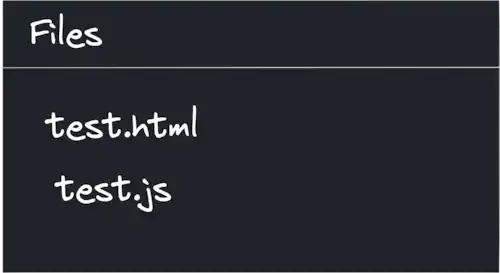
- Create a file with
.htmlextension alongside your js file - Paste the following code in it and replace
yourjsfile.jswith your js file name<html> <body> <script src="yourjsfile.js"></script> </body> </html>
- If Done right the files should look something like this
- Install a VSCode extension called live server
- Open The html file
- Right click and select open with live server
- A browser window should open
- Open the console here
- Now start writing your code in the js file
- As soon as you savve the file your output should be visible in the console
Enough theory let's start learning some JavaScript
Comments
There are two types of comments in JavaScript Single Line Comments these
start with //
example
// This is a single line comment that will not be parsed or executed by JS engineMulti Line or Block Comments anything between /* */ is a block comment
example
/*
    This is a block comment that
    Spans multiple lines
*/
Doc Comments anything between /** */ is a doc comment, doc comments are
used to give additional information about a variable, function, class etc to the
developer using our code or help our future selves to understand a complex
piece of code that may be hard to understand
example
/**
    This is a function that calculates the factorial of a number
*/
function factorial(n) {
  if (n == 0 || n == 1) return 1;
  return n * factorial(n - 1);
}
We will discuss more about functions in later sections
Data Types
JavaScript has two categories of data types
- Value Types
- string
- number
- boolean
- undefined
- null
- Reference Types
- array
- object
we will look at each of them in detail soon
Variables
Variable is a container that can store some piece of data in the memory with a name assignned to it
Creating Variables
in JavaScript a variable declaration starts with the let keyword followed by
an identifier and optionally a value assigned to it
for example
let variable1;
let num = 10;
If you log these in the console like so you should see undefined 10 printed to
the console
console.log(variable1, num);Variables can be re assigned
example
let myVar = 10;
console.log(myVar); // 10
myVar = 20;
console.log(myVar); // 20Note: you can also create variables using the
varkeyword but it is a leagcy JavaScript feature, please avoid using it as much as possible, and no I am not going to talk about it here
Constants
A constant in JavaScript is just like a variable but it cannot be re assigned
Creating Constants
Constants in JavaScript is created with the const keyword followed by an
identifier followed by a value assignment (which is not optional)
for example
const PI = 3.141592653;

console.log(PI); // 3.141592653Note: It is common to name literal constants like PI in all uppercase
The Number Type
In JavaScript there is only one number type that represents any kind of number like integer or a floating point number
Some operations on numbers
Addition
let sum = 10 + 20; // sum = 20
sum += 10; // sums 10 to the current add value
console.log(add); // 30
Subtraction
let diff = 20 - 10; // diff = 10
diff -= 10;
console.log(diff); // diff = 0
Multiplication
let prod = 1.5 * 20; // prod = 30
prod *= 2; // prod = 60
Division
let div = 3 / 2; // div = 1.5
div /= 1.5; // div = 1
Power
let cube = 3 ** 3; // cube = 27Increment
let i = 0;
i++;
console.log(i); // 1
Decrement
let d = 1;
d--;
console.log(d); // 0
The String Type
In JavaScript strings are a sequence of characters but unlike other languages we don't have special type that represents a single character
example
let name = "Shreyas";
console.log(name); // Shreyas
Strings can be created with single quotes or double quotes example
let quote = 'Shreyas said, "JavaScript is a programming language"';
console.log(quote); // Shreyas said, "JavaScript is a programming language"
example
let sentence = "It's a line with single quotes";
console.log(name); // It's a line with single quotes
String operations
uppercase example
// To Upper Case
console.log("ThIS iS a StrINg".toUpperCase()); // THIS IS A STRING
// To Lower Case
console.log("ThIS iS a StrINg".toLowerCase()); // this is a string

// String Concatenation
let world = "World" + "!";
console.log("Hello" + ", " + world); // Hello, World!

// Number to a string
let n = 4;
console.log(n.toString()); // 4

// Strintg to a number
let str = "12345";
console.log(+str); // 12345 (in color :) )
String Template literals
This is a simpler from of string concatenation
let hello = "Hello";
let world = "World";
let str = `${hello}, ${world}!`;
console.log(str); // Hello, World!
The Boolean type
Bolean is JavaScript represents a true or false condition.
There are two boolean literals true and false
for example
let isGrater = 3 > 4; // false because 3 is less than 4Logical operators
Negation
returns the opposite boolean value of the given value example
console.log(!true); // false
console.log(!false); // true
Also works with value types too, in JavaScript every value can be coersed (implicitly converted) into a boolean value a few examples are given below
console.log(!0); // true
console.log(!1, !2); // false
console.log(!""); // true
console.log(!"non empty"); // false

console.log(!null, !undefined); // true true
Double Negation
can be used to find the truth value of a value or a variable for example
let x = 10;
let y; // undefined
let z = null;
let e = "";
let nonE = "non empty";

console.log(!!x); // true
console.log(!!y); // false
console.log(!!z); // false
console.log(!!e); // false
console.log(!!nonE); // true
Equlity
Unlike other languages JavaScript has two equality operators
- The
==operator - The
===operator
We will only use the second one because it's modern and actually logical
The equality operator returns true if both the values are equal
example
let isEqual = 10 === 5 + 5; // true
isEqual = "10" === 10; // false
note
"10" == 10with==returns true because of something called type coersion which we aren't ging to go in depth into but remember to use===and not==
other logical operators
- Grater than and Less than
// Grater than
console.log(10 > 20); // false
// Lesser than
console.log(10 < 20); // true
// Grater than or equal
console.log(10 >= 20); // false
// Lesser than or equal
console.log(10 <= 10); // true
The Ternary operator
Used to assign a value based on a condition
for example
let condition = 6 <= 10; // condition = true
let value = condition ? 6 : 4; // value = 6 because 6 is less than or equal to 10
Control flow
if else
example
if (3 > 4) {
  console.log("3 > 4 ?");
} else if (1 === 1) {
  console.log("It's true");
} else {
  console.log("Not Possible");
}
While
loops until the condition provided returns true
example
while (true) {
  // Runs forever
} // Running this in your browser will crash the page

// This code logs 0 to 9 in the console
let x = 0;
while (x < 10) {
  console.log(x);
  x++;
}
For
example
// This logs 0 to 9 to the console
for (let i = 0; i < 10; i++) {
  console.log(i);
}
Arrays
arrays are a sequence of values of any type
Creating an array
let arr = [1, "Banana", true, null];Finding the length of an array
console.log(arr.length); // 4Accessing elements of an array
Arrays in JavaScript are zero indexed so the numbering of elements of array starts from 0
console.log(arr[0]); // 1
console.log(arr[1]); // Banana
console.log(arr[2]); // true
console.log(arr[3]); // null
Note There is no out of bounds error if you try to access an eement at a non existing index it just returns
undefined
example
console.log(arr[4]); // undefined
console.log(arr[-6]); // undefined
Modifying the array
Adding elements at the end
arr.push(5);
console.log(arr); // [ 1, 'Banana', true, null, 5 ]
Removing elements from the end
arr.pop(); // 5
console.log(arr); // [ 1, 'Banana', true, null ]
Objects
objects in JavaScript are just key value pairs (like hash map/dictionary/associative arrays in other languages)
example
let person = {
  name: "Person's Name",
  age: 34,
};

console.log(person); // { name: "Person's Name", age: 34 }
accessing properties of an object
console.log(person.name); // Person's Name
console.log(person.age); // 34

// OR
console.log(person["name"]); // Person's Name
console.log(person["age"]); // 34

// We can modify the values of an object too
person.age = 35;
console.log(person.age); // 35
Functions
Function is a block of code that can take 0 or more input parameters and return 0 or 1 output that only runs when explicitly called
example
function simpleFunction() {
  console.log("Log from a function");
}

simpleFunction(); // Log from a function

function withParams(name, age) {
  console.log(`Hi I am ${name} and I am ${age} years old`);
}

withParams("Alice", 24); // Hi I am Alice and I am 24 years old

function add(a, b) {
  return a + b;
}

let sum = add(3, 4);
console.log(sum); // 7
Object methods
There can be functions associated with objects too
example
let person = {
  firstName: "Bob",
  lastName: "Smith",
  getName() {
    return `${this.firstName} ${this.lastName}`;
  },
};
the
thiskeyword in the constructor represents the current object instance
Constructor Functions
Unlike other Object oriented languages there are no classes in JavaScript
Note There are classes in JavaScript but are syntactic sugar for Constructor functions
example
function User(firstName, lastName) {
  this.firstName = firstName;
  this.lastName = lastName;
  this.name = `${firstName} ${lastName}`;
}
new user objects can be created from the Constructor function
let john = new User("John", "Doe");
console.log(john); // { firstName: 'John', lastName: 'Doe', name: 'John Doe' }
The Prototype
The most dreaded concept of JavaScript is the Prototype but let's make it simpler
In the above constructor we assign name attribute to the combination of first and last name but what if we change either of the properties after object instantation (creation), it doesn't update to fix this we will add a prototype method to the User function to compute the name of the user when called
This is same as the object method but this applies to all the objects created with this constructor
example
User.prototype.getName = function () {
  return `${this.firstName} ${this.lastName}`;
};

// Now let's use it

let jane = new User("Jane", "Smith");
console.log(jane.getName()); // Jane Smith
console.log(jane.name); // Jane Smith

// If we change the user's properties

jane.lastName = "Doe";
console.log(jane.getName()); // Jane Doe
console.log(jane.name); // Jane Smith

// the prototype method returns the updated name but the name property doesn't
The Class
Writing constructor functions and the prototype methods is a mess and not very maintainable so most modern browsers support the class declaration which is identical to a constructor function but is simpler to write and maintain
Let's re-write the User constructor with class syntax
class User {
  constructor(firstName, lastName) {
    this.firstName = firstName;
    this.lastName = lastName;
  }

  getName() {
    return `${this.firstName} ${this.lastName}`;
  }
}
As you can see this is much simpler to write and understand
Inheritance
JavaScript supports prototypal inheritance which is basically inheritance but with prototypes We can inherit a different prototype for a different prototype but that's messy and not readable so we will simply stick to the class syntax
create a base class
class Animal {
  constructor(name, sound) {
    this.name = name;
    this.sound = sound;
  }

  makeSound() {
    console.log(`${this.name} says ${this.sound}`);
  }
}
extend the clsss
class Dog extends Animal {
  constructor(legs) {
    // calling the base class constructor
    super("Dog", "BOW BOW!!");
  }

  bark() {
    // call the base class method
    super.makeSound();
  }
}

let d = new Dog();
// calling the base class method
d.makeSound(); // Dog says BOW BOW!!
d.bark(); // Dog says BOW BOW!!
Methods in the derived class can override those from the base class by just re-defining the method in the derived class with the same name and the super.method() calls the base class method even ofter overriding the method
JSON - JavaScript Object Notation
This is a data exchange format that can be used to transfer data between two different programs JSON is a string with the data encoded as a JavaScript object
JSON supportsall the JavaScript types except functions
creating JSON string
let person = {
  name: "John Doe",
  age: 32,
  graduated: true,
  hobbies: ["playing", "listening to music"],
};

let json = JSON.stringify(person);
console.log(json); // {"name":"John Doe","age":32,"graduated":true,"hobbies":["playing","listening to music"]}
Now this JSON string can be sent to a differnt server or a program
getting the actual object back from the JSON string
let data = JSON.parse(
  `{"name":"John Doe","age":32,"graduated":true,"hobbies":["playing","listening to music"]}`
);
console.log(data);
// {
//     name: 'John Doe',
//     age: 32,
//     graduated: true,
//     hobbies: [ 'playing', 'listening to music' ]
// }
That's it this is the introduction to JavaScript basics. I will go into asynchronous JavaScript in the future articles